Skip to content

universalspeedtest.com

Universal speed test that tells you what your numbers mean

Measure download, upload, ping, jitter, packet loss and bufferbloat in about 20 seconds — then get a plain-English verdict for gaming, streaming and video calls.

How we test

Free forever · No ads · No signup · Works with ACT, Hathway and any ISP worldwide

Speed test

How fast is your internet, really?

One run measures download, upload, ping, jitter, packet loss and latency under load — then tells you what that means for your games and streams.

≈20 seconds · typically 50–200 MB of data · no signup, no ads

Packet loss and “under load” latency are estimated over HTTP from the browser — no ICMP is available on the web. Speeds are measured against the nearest Cloudflare edge location and never leave your device.

Gaming network test

Will your connection hold up in a ranked match?

—out of 100
Run the test first

Ping, jitter and packet loss decide whether your shots land where you aimed. Run the speed test above and we’ll score your connection from 0 to 100 for competitive gaming — based on the numbers games actually care about.

Latency—

— / 100 · weight 40%

Jitter—

— / 100 · weight 20%

Packet loss—

— / 100 · weight 20%

Under load—

— / 100 · weight 20%

Online gaming

BGMI, Valorant, Fortnite, Call of Duty

—
  • Run the test to check this.

Cloud gaming

GeForce NOW, Xbox Cloud, Amazon Luna

—
  • Run the test to check this.

4K streaming

Netflix, YouTube, Prime Video

—
  • Run the test to check this.

Video calls

Zoom, Google Meet, Microsoft Teams

—
  • Run the test to check this.

Downloads & backups

Large files, cloud backup, game updates

—
  • Run the test to check this.

Gaming

Is your network suitable for online gaming?

A dedicated test scores ping, jitter, packet loss, bufferbloat and stability against published thresholds — and keeps frame rate where it belongs: on your hardware.

Gaming internet test

The metrics

Six numbers that describe your connection

Every speed test reports the first two. These six together tell you whether your network can handle your actual life — and what to fix when it can’t.

Download speed

How fast your connection pulls data down: page loads, HD streams, game updates, phone backups. We run four parallel streams for up to ten seconds and discard the first second of connection warm-up, so brief bursts never inflate your result.

Good looks like: 25 Mbps for 4K · 100 Mbps feels instant · 30–50 Mbps suits a family of four

Upload speed

How fast you send data out: video-call video, cloud backups, WhatsApp media, streaming gameplay. Most Indian broadband and AirFiber plans are asymmetric — upload is the first thing to starve when a video call freezes.

Good looks like: 5 Mbps for HD calls · 10+ Mbps for streaming and backups

Ping / latency

The round-trip time of a tiny packet — the delay between your button press and the server hearing it. This is the number online games live or die by; extra megabits will never rescue a 150 ms ping.

Good looks like: Under 30 ms excellent (Mumbai servers) · under 60 ms fine · over 120 ms feels delayed

Jitter

How much ping varies from sample to sample. A low average with high jitter still feels awful: characters teleport, voices glitch and shots seem to land late, because packets arrive in a ragged rhythm.

Good looks like: Under 5 ms is studio-clean · under 15 ms comfortable · over 30 ms is a problem

Packet loss

The share of data that never arrives and has to be sent again. Even 1–2% loss drops call audio and delays hit registration. Browsers cannot send ICMP pings, so we estimate loss from failed and timed-out HTTP probes — honest, but not lab-grade.

Good looks like: 0% ideal · under 1% acceptable · above 2% you will feel it

Bufferbloat (under load)

Your ping while the connection is busy — someone streaming, a backup running, a console updating. If latency spikes by hundreds of milliseconds, your router’s buffers are too big, and your game stutters exactly when the house comes online.

Good looks like: Grade A: +10 ms or less · under +50 ms fine · +200 ms means enable SQM / fq_codel

Methodology

How we test (and where we’re honest about limits)

Nearest edge, parallel streams

Transfers run against Cloudflare’s global edge — Mumbai, Chennai, Delhi and 400+ other cities — over four parallel streams so single-connection limits never cap your line.

20 latency probes, warm-up included

Idle ping is the mean of twenty zero-byte round trips after two warm-up requests. Jitter is the mean absolute deviation between consecutive samples (RFC 3550 style).

Honest packet loss

The web platform has no ICMP access, so loss is estimated from HTTP probes that fail or time out. We label it as an estimate instead of pretending it’s a ping sweep.

Bufferbloat under real load

While downloads saturate your pipe, we keep firing latency probes and report how far your ping climbs. That delta is your bufferbloat — the lag that appears when the house is busy.

ISP identification, no tracking

One lookup to ipwho.is reveals your ISP, ASN and city; edge headers confirm the test location. We don’t store, share or profile any of it — the site has no backend to store it in.

Static, fast, ad-free

The whole site is static files on a CDN. No ad slots, no cookie banners, no accounts — which is also why it loads quickly on a 4G phone.

About the tool

About Universal Speed Test — one free speed test for every connection

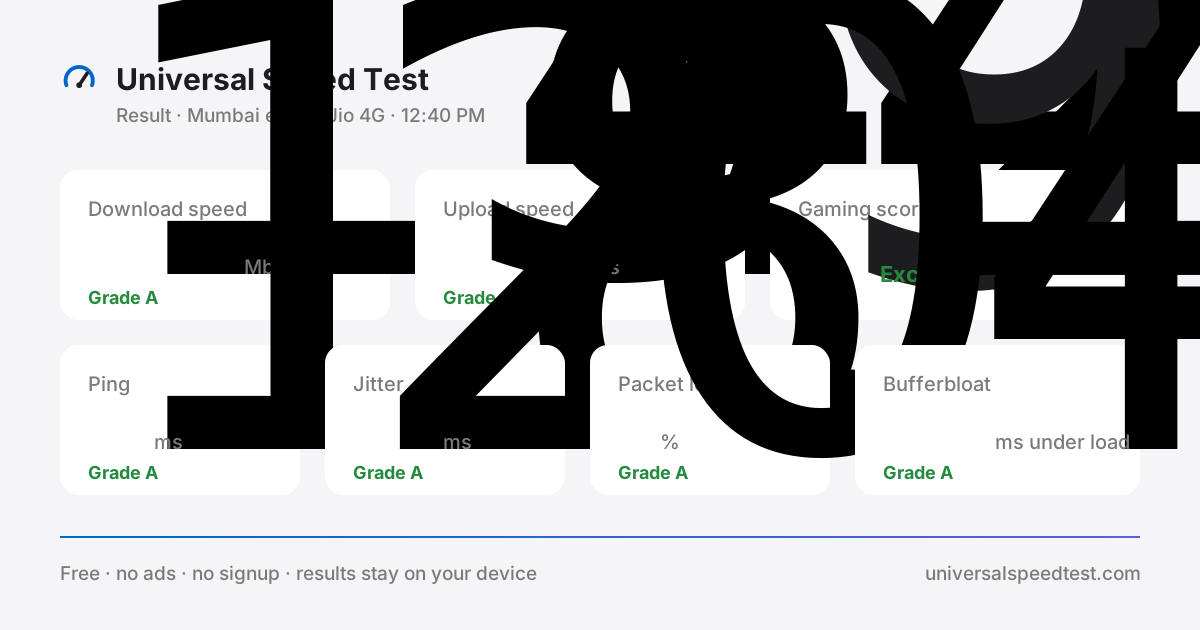
Universal Speed Test result card showing download speed 142.6 Mbps, upload speed 34.2 Mbps, ping 18 ms, jitter 2.4 ms, 0% packet loss, +12 ms bufferbloat and a gaming score of 92
A completed run: six graded metrics and a gaming score, explained in plain English below.

Universal Speed Test is a free, browser-based internet speed test built around one honest question: is your connection delivering what you actually pay for? About twenty seconds after you press start you get six measurements — download speed, upload speed, ping, jitter, packet loss and bufferbloat — each graded against thresholds we publish in full, then translated into plain-English verdicts for gaming, streaming, video calls and backups. Nothing to install, no account to create, no advertising. The whole universal speed test runs on your device and your results never leave it.

What this internet speed test measures

Six numbers, and each one answers a different question. Download speed tells you how fast the line pulls data down — page loads, HD and 4K streams, game updates and phone backups. Upload speed is how fast you send data out: video-call video, cloud backups and shared files, and it is usually the first thing to starve when a call freezes. Ping is the round-trip time of a tiny packet, the delay between your button press and the server hearing it. Jitter measures how much ping varies between samples — a steady 60 ms feels far better than a line flipping between 20 and 90. Packet loss is the share of data that never arrives and has to be sent again. Bufferbloat is your ping while the connection is busy, which is why a match stutters the moment somebody starts a download. Every one of these network speed test metrics is explained with healthy ranges in the metrics section.

One network speed test, fair to every provider

Your provider does not change how this tool works. Every run uses the same method: four parallel streams to the nearest Cloudflare edge — Mumbai, Chennai, Delhi and hundreds of other cities — twenty latency probes, a timed upload, and continuous latency sampling while the line is saturated. That consistency is what makes a Jio speed test directly comparable with an Airtel speed test, a Vi speed test or a BSNL speed test — and what makes results from ACT, Hathway or any broadband provider worldwide equally valid. The ISP pages add the context: what your specific network should look like when it is healthy, the usual suspects behind bad numbers, and fixes to try before you call support.

A WiFi speed test that finds the weak link

Most “slow internet” complaints are not the ISP at all — they are the last few metres. Run this WiFi speed test standing next to the router, then again from the room where you actually work or play. If the near-router result matches your plan and the far-room result collapses, the problem is walls, bands or placement, not your subscription. Plug in by ethernet and you get a third reading that isolates the line itself. Doing the same comparison on mobile data tells you whether Wi-Fi or the mobile network is the weak link. Three runs, three minutes, and you know exactly what to fix: a router move, the 5 GHz band, a mesh node, or a support ticket with evidence attached.

A verdict, not just a table of numbers

A speed test that stops at six numbers leaves you guessing. This one grades each metric, scores your connection for online gaming using published weights, and shows what the result means for the things you actually do: 4K streaming, competitive gaming, cloud gaming, video calls and large backups. If the gaming internet test comes back Excellent, your network will not be the reason you lose a fight. If streaming keeps buffering, the upload and bufferbloat tiles usually explain it in one glance. The same instrument runs on every ISP page and every game-specific guide, so the verdict follows you around the site.

Built mobile-first, private by design

Most people run a speed test on a phone, so this one is designed for a 4G and 5G screen first: large tap targets, no pinch-zooming, and a test that stops itself early on slow lines instead of burning through your data. The site is static files served from a CDN, which is why it still loads quickly when the network is struggling. There are no cookies, no analytics and no accounts. Your latest result is kept in your browser’s local storage so you can compare a morning run with an evening one, and it disappears the moment you clear your browser data.

How to get a result you can trust

Close the streaming tab and pause the downloads. Connect by ethernet if you can, or stand within a few metres of the router on 5 GHz. Turn off any VPN. Run the test once to warm the connection and once more for the number you record. Repeat at two different hours — morning and 9 PM — because evening congestion changes everything on shared mobile towers and busy broadband exchanges. And test the network you actually care about: Wi-Fi off means you are measuring your SIM, Wi-Fi on means you are measuring the router. Keep both results; the gap between them is the diagnosis.

Start your free speed test

Press start above and you will have your numbers before the kettle boils. If you would rather see what your specific network should deliver first, pick your provider: the Jio speed test, Airtel speed test, Vi speed test or BSNL speed test, or browse every ISP speed test we publish. Gamers can jump straight to the gaming test for ping, jitter and packet loss scored against published thresholds — and when you are ready, the universal speed test itself is one tap away.

Speed test basics

How to test your internet speed

How to test internet speed on a phone, PC or over WiFi, what each number means and what counts as a good result — the short answers people look for before their first run.

How do I test my internet speed?

Open this page and press Start speed test — keep the tab open for the roughly 20 seconds it takes to finish. The test measures download, upload, ping, jitter, packet loss and bufferbloat on the network you are using right now. For a fair reading, close streaming tabs and downloads, pause cloud sync, and test the connection you actually care about: Wi-Fi for your everyday experience, ethernet for the cleanest number.

How to test WiFi speed?

Run the test on a phone or laptop that is connected to Wi-Fi — not on mobile data or ethernet — standing a few metres from the router, then repeat from further away or another room. The gap between the two runs is your Wi-Fi overhead. Walls, the 2.4 GHz versus 5 GHz band and neighbours on the same channel all show up here. If Wi-Fi and ethernet give the same numbers, the limit is your plan, not your wireless.

What’s my speed test result?

Download is how fast content arrives — streaming, browsing, video calls. Upload is how fast you send — attachments, cloud backups and your camera in a meeting. Ping and jitter measure responsiveness, and lower is better for gaming and calls. Packet loss should be zero, and bufferbloat shows how far your ping jumps when someone else starts a download. The verdict line under the result translates all of it into plain English.

What is an internet speed test?

An internet speed test measures how well your connection moves data. It pulls and pushes sample files between your device and a test server, recording throughput in Mbps plus latency in milliseconds. Think of it as a check-up for your line: it shows what your connection actually delivers today — which is often not what your ISP advertises — and gives you a baseline to spot problems against later.

How to test internet speed on PC?

The same page works in any modern desktop browser — Chrome, Edge, Firefox or Safari — and nothing needs to be installed: open the site, press Start speed test and wait about 20 seconds. For the most accurate result on a PC, use an ethernet cable if you can, close streaming tabs and game launchers, pause OneDrive or iCloud sync, then run the test twice — the second run is usually the steadier number.

What is a good speed test result?

It depends on what you do. For solo browsing and HD streaming, 25 Mbps down is comfortable; a busy 4K household wants 100 Mbps or more. Video calls need 5–10 Mbps up. For gaming, latency beats raw speed: ping under 50 ms, jitter under 15 ms and zero packet loss will outplay a huge download number every time. Upload under 5 Mbps is what makes calls and cloud backups feel sluggish.

FAQ

Questions people actually ask

What internet speed do I need for online gaming in India?

Speed matters far less than latency. 10–20 Mbps down and 5 Mbps up is plenty for BGMI, Valorant, Fortnite or Call of Duty. What decides your matches is ping under 50 ms to your server region (Mumbai for Indian servers), jitter under 15 ms and zero packet loss. A 300 Mbps line with a 120 ms ping will consistently lose to a 50 Mbps line sitting at 25 ms.

Why is my ping high on Jio, Airtel or my broadband?

The usual suspects: Wi-Fi instead of ethernet (adds 5–15 ms plus jitter), routing to distant game servers (India to Singapore adds 60–90 ms), peak-hour congestion on shared lines, or a VPN/proxy in the path. Run this test on Wi-Fi, then on mobile data — the ISP and location shown in your results reveal which network your traffic actually takes.

Does this speed test work on mobile data and Jio AirFiber?

Yes — it is built mobile-first. On 4G and 5G, speeds swing with signal strength, distance from the tower and congestion, so test at different times of day for a realistic picture. A run on a fast connection transfers up to about 200 MB; slower lines use far less because the test stops itself early.

How accurate is a browser-based speed test?

Very close to what your line can actually deliver. Browser networking has matured enough to saturate gigabit links, and multi-stream transfers avoid single-connection bottlenecks. Expect results within roughly ±5–10% of lab tools — and note that this number is arguably more useful: it is exactly the performance your browser experiences.

Why is my speed lower than the plan I pay for?

Providers advertise “up to” speeds, best-case. Wi-Fi distance, wall materials, other devices downloading, and even your phone’s CPU can cut the number. Test standing next to the router with everything else idle — if you are still far below plan speeds over ethernet, that is evidence to take to your ISP.

Is my data stored? Is this really free?

The test runs entirely in your browser. Results stay on your device — we keep only your last result in browser storage (localStorage) so you can compare, and you can clear it any time. The single external request is an IP/ISP lookup to ipwho.is. No accounts, no ads, no analytics on your results, nothing uploaded to us.